TDS on Salary (Section 192): Form 16, TRACES & Tax Credit Mismatch Guide
The ultimate salaried professional's guide to Section 192 tax withholding for FY 2026-27 (AY 2027-28). Unpack the dual architecture of Form 16 Part A and Part B, reconcile Form 26AS and AIS discrepancies, and invoke Section 205 legal protections if your employer deducted tax but failed to deposit it.
Executive Summary: Navigating Corporate Tax Withholding
For over 70 million formal sector employees across India, the monthly salary credit SMS is preceded by a significant deduction under the label "TDS" (Tax Deducted at Source). Governed by Section 192 of the Income Tax Act, 1961, this statutory withholding represents the single largest revenue stream of direct taxes collected by the Central Government.
While payroll deductions operate smoothly in established corporations, structural friction often arises during year-end tax reconciliations. Employees discover discrepancies between their net monthly payslips, their annual Form 16, their Form 26AS, and their Annual Information Statement (AIS). When an employer deducts tax but fails to upload accurate PAN mapping to the Income Tax Department's TRACES (TDS Reconciliation Analysis and Correction Enabling System) portal, the employee faces automated tax demand notices and blocked refunds.
Key takeaways for Assessment Year 2027-28 (Financial Year 2026-27):
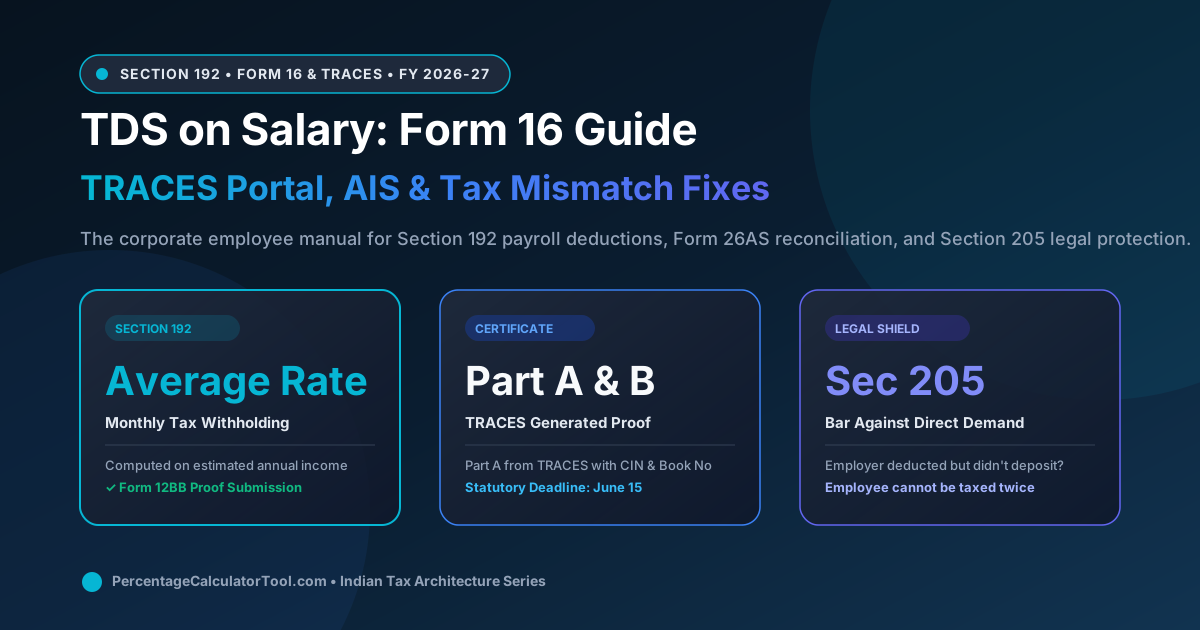
- The "Average Rate" Dynamic (Section 192(1)): Employers do not deduct TDS at flat rates (like 10% under Section 194J); they must calculate the employee's estimated annual tax across all slabs and deduct one-twelfth of that liability every month.
- The Form 16 Split: Form 16 is not a single document. Part A is an official government certificate generated exclusively from the TRACES portal bearing a unique 16-character alphanumeric code. Part B is an internal payroll annexure prepared by the employer showing the gross salary computation.
- The Statutory Deadline (June 15): Employers must furnish Form 16 to employees by June 15 following the end of the financial year. Failure to do so exposes the employer to mandatory penalties under Section 272A(2)(g) of ₹500 per day of default.
- Absolute Legal Immunity (Section 205): Under Section 205, if tax has been deducted from your salary, the Income Tax Department is statutorily barred from demanding that tax from you, even if your employer subsequently defaulted or entered corporate insolvency.
1. Statutory Mechanics of Section 192: The Average Rate Rule
Section 192(1) of the Income Tax Act dictates that any person responsible for paying any income chargeable under the head "Salaries" shall, at the time of payment, deduct income tax on the amount payable at the average rate of income tax computed on the basis of the rates in force for the financial year.
Unlike payments to contractors (Section 194C @ 1% or 2%) or professionals (Section 194J @ 10%), where withholding is a static percentage of each invoice, Section 192 requires continuous, dynamic forecasting. The employer's payroll engine executes the following monthly calculation:
- Estimate Annual Gross Salary: Projected Basic Salary + HRA + Special Allowance + Annual Bonus + Perquisites (company car, accommodation) for all 12 months.
- Apply Deductions under Section 16: Flat standard deduction of ₹75,000 (New Regime) or ₹50,000 + Professional Tax (Old Regime).
- Factor in Form 12BB Proofs (Old Regime): Validated investments in Section 80C (PPF, ELSS, EPF up to ₹1.5L), Section 80D (health insurance up to ₹1,00,000), Section 24(b) home loan interest (up to ₹2,00,000), and Section 10(13A) HRA exemption.
- Compute Annual Net Tax Liability: Calculate tax across the relevant slab schedule, add 4% Health and Education Cess, and apply Section 87A rebate (if taxable income ≤ ₹7 Lakhs New or ₹5 Lakhs Old).
- Divide by Remaining Months: Subtract TDS already deducted in preceding months and divide the remaining balance equally among the remaining payroll cycles.
$$\text{Monthly TDS} = \frac{\text{Estimated Total Annual Tax} - \text{TDS Deducted in Prior Months}}{\text{Months Remaining in Financial Year}}$$
This dynamic formula explains why employees often experience a sudden spike in TDS deductions during January, February, and March if they fail to submit their investment proofs on time: when the employer removes provisional 80C or HRA deductions, the entire back-tax liability is compressed into the final three paychecks.
2. The Complete TDS Lifecycle: From Payroll Declaration to ITR Credit
TDS compliance is not an isolated event; it is a synchronized annual cycle spanning the employee, corporate payroll, the banking system, and the central tax cloud. The diagram below illustrates each critical phase of this journey.
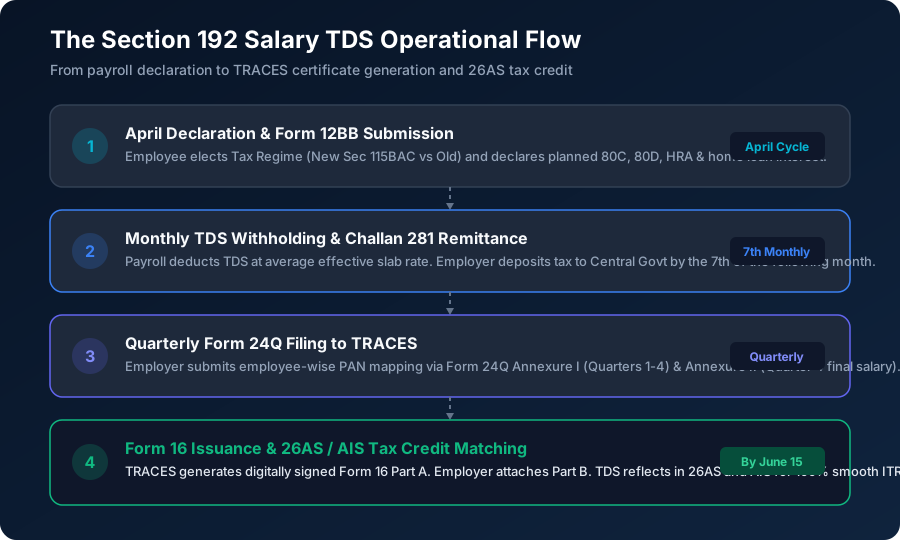
The lifecycle encompasses four vital stages:
Stage 1: April Regime Intimation & Declaration
At the beginning of each fiscal year (April), employees declare their preferred tax regime. Under the default statutory rules, the employer must apply the New Tax Regime (Section 115BAC) unless the employee explicitly submits an intimation to calculate TDS under the Old Tax Regime.
Stage 2: Monthly Withholding & Challan 281 Remittance
Under Rule 30 of the Income Tax Rules, any tax withheld by an employer during a calendar month must be deposited to the credit of the Central Government on or before the 7th day of the following month (e.g., TDS withheld from October salary paid on October 31 must be deposited by November 7). Remittance is executed via Challan ITNS 281.
Stage 3: Quarterly Form 24Q Filing to TRACES
Depositing money is insufficient; the employer must inform the government whose money was deposited. Every quarter, the employer files Form 24Q:
- Annexure I (Filed Every Quarter): Details the Challan CIN numbers and maps specific rupee amounts to each employee's 10-digit PAN.
- Annexure II (Filed Only in Quarter 4): Provides the exhaustive salary computation sheet for the entire year for every single employee.
Stage 4: TRACES Certificate Generation (Form 16)
Once the Quarter 4 Form 24Q is validated by the Directorate of Income Tax (Systems), the central TRACES server generates digitally signed Form 16 Part A certificates. The employer merges Part A with Part B and distributes the document to employees by June 15.
3. Anatomy of Form 16: Part A vs Part B Explained
A frequent source of confusion is treating Form 16 as a monolithic document. In statutory reality, Form 16 consists of two distinct components governed by entirely different legal standards.
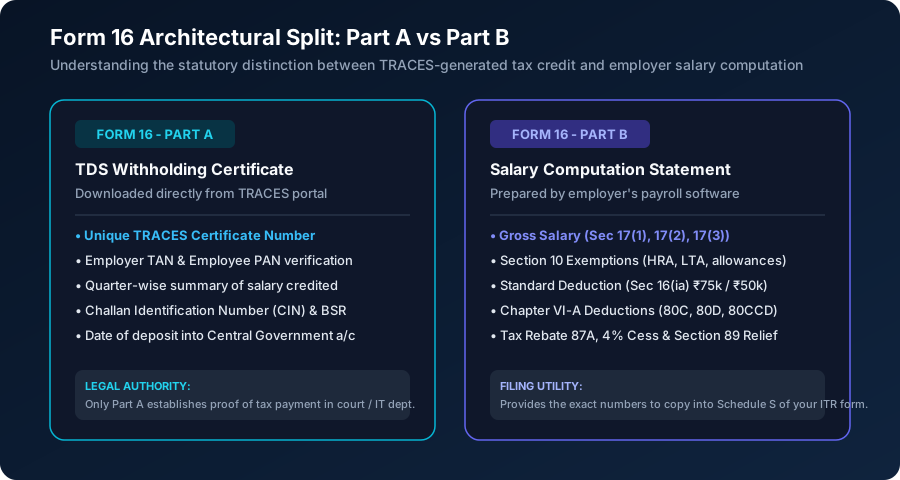
The table below highlights the operational and evidentiary distinctions between the two parts:
| Attribute | Form 16 - Part A | Form 16 - Part B |
|---|---|---|
| Issuing Authority | Generated directly by TRACES Portal (CBDT) | Generated by Employer's Internal Payroll Software |
| Primary Purpose | Legal certificate proving tax was deposited with Govt | Detailed worksheet showing how taxable pay was derived |
| Unique Identifier | 16-character alphanumeric TRACES Certificate Number | None (Internal corporate reference) |
| Security Features | TDS-CPC Watermark + Digital Signature (PKI) | Authorized corporate signatory stamp / digital sign |
| Quarterly Breakup | Displays salary paid & TDS deducted for Q1, Q2, Q3, Q4 | Annual consolidated figures only |
| Legal Evidentiary Weight | Absolute conclusive proof of tax credit under Rule 31 | Informational worksheet; subject to verification |
When you receive your Form 16, always inspect the background of Part A: it must carry the official TRACES logo watermark embedded across the center of every page. If your employer hands you a Part A that lacks this watermark, it is an unofficial draft that will not protect you if tax credits fail to reflect on the portal.
4. Common Causes of Form 26AS and AIS Tax Credit Mismatches
When logging in to the Income Tax e-filing portal to prepare your annual return, you might discover that the TDS credit reported in your salary slips does not match the figure displayed in Form 26AS or the Annual Information Statement (AIS). Filing your return claiming the higher salary slip figure without rectifying this mismatch will trigger an automated demand notice under Section 143(1)(a).
The primary causes of TDS credit mismatches include:
- Typographical PAN Error: The payroll operator transposed two digits in your PAN during quarterly Form 24Q filing. The tax was deposited with the treasury, but credited to an unknown third party's PAN.
- Unfiled or Late Form 24Q (Quarter 4): The statutory deadline for employers to file Q4 Form 24Q is May 31. If your employer files late or faces technical rejection from the NSDL portal, TRACES will not update your Form 26AS until the return is processed.
- Challan Mismatch (Oltas Error): The employer deposited the tax under the wrong Minor Head (e.g., selecting Corporate Tax 0020 instead of Individual Income Tax 0021), preventing TRACES from mapping the challan to salary TDS.
- Delayed Challan Clearance: The employer issued salary slips reflecting TDS, but delayed remitting the physical cash challan to the bank, leaving the deduction unbacked by government receipt.
5. Legal Shield under Section 205: Why You Cannot Be Taxed Twice
What happens if your employer went bankrupt, shut down operations, or simply absconded without depositing the TDS deducted from your monthly salary? Will the Income Tax Department freeze your bank account and demand the unpaid tax from you?
The statutory answer is an emphatic NO. Section 205 of the Income Tax Act provides an absolute legal shield to salaried citizens:
This principle has been repeatedly affirmed by constitutional courts across India:
- Delhi High Court (Court On Its Own Motion vs UOI [2013]): The High Court held that once TDS has been deducted from an employee's salary, the assessing officer has zero statutory jurisdiction to raise a tax demand against the employee or hold back their refund, even if the employer defaulted on government deposit.
- Bombay High Court (Yashpal Sahni vs Rekha Hajarnis [2007]): The Court ruled that the employer acts as an agent of the Central Government for tax collection. If the agent embezzles or delays the remittance, the government's remedy lies exclusively against the employer under Section 201 (Assessee-in-Default) and prosecution under Section 276B, not against the employee.
- CBDT Office Memorandum (F.No. 275/29/2014-IT(B)): The CBDT issued binding instructions to all field officers directing that no coercive recovery measures shall be initiated against taxpayers where tax has been deducted by the deductor.
If you receive an automated intimation under Section 143(1) demanding tax that was already withheld on your payslips, you can submit your monthly salary slips and employment agreement as conclusive evidence under Section 205 to quash the demand.
6. Step-by-Step Protocol to Resolve Uncredited TDS
If you identify a tax credit mismatch before or after filing your return, execute this four-step resolution sequence:
- Step 1: Download Detailed Form 26AS & AIS: Log in to the e-filing portal, open Form 26AS via the TRACES link, and download the Annual Information Statement (AIS) in PDF and JSON. Verify whether the discrepancy is in Q1, Q2, Q3, or Q4.
- Step 2: Compare Payslips with Form 16 Part A: Sum up the exact TDS deducted across all 12 monthly salary slips. Check if the total equals the aggregate TDS credited in Form 16 Part A.
- Step 3: Issue Formal Notice to Corporate Payroll: If a discrepancy exists, write an official email to your HR and payroll finance teams requesting a Form 24Q Correction Statement. The employer must file a correction return (C1 for challan correction, C2 for PAN correction, or C3 for salary detail updates).
- Step 4: Track TRACES Correction Processing: Once the employer files the correction return, TRACES typically processes the update within 7 to 14 business days. Re-download Form 26AS to confirm that the revised tax credit is fully populated.
7. Switching Tax Regimes at ITR Filing: Payroll vs Return Reality
A widespread corporate myth suggests that if your employer deducted monthly TDS under the New Tax Regime, you are irrevocably locked into the New Regime when filing your annual return.
This is legally incorrect. Under Section 115BAC(6), a salaried individual who does not have income from business or profession (PGBP) is entitled to exercise their choice of regime each year at the time of filing their return of income under Section 139(1).
Consider this scenario:
- Rahul's employer deducted TDS under the New Tax Regime throughout FY 2026-27 because Rahul missed the April declaration window.
- In July 2027, Rahul compiles his actual rent receipts (HRA exemption ₹2.4 Lakhs), home loan interest certificate (₹2 Lakhs), and 80C/80D investments (₹2 Lakhs).
- When filing ITR-1, Rahul selects the Old Tax Regime.
- The e-filing portal recalculates his total liability under the Old Regime, reveals that his employer over-deducted TDS by ₹45,000, and automatically generates a tax refund credited directly to Rahul's pre-validated bank account with 0.5% monthly interest under Section 244A.
Verify Your Payslip TDS & In-Hand Salary
Wondering whether your monthly payroll TDS matches statutory slab rules? Use our client-side calculators to verify your exact in-hand salary and tax deductions across both regimes.
8. Frequently Asked Questions (FAQ)
How does an employer compute monthly TDS under Section 192?
Under Section 192(1), the employer estimates the employee's total annual taxable income for the financial year (after accounting for standard deduction and declared exemptions/investments under Form 12BB), computes the total income tax payable under the chosen tax regime, and divides this net tax by the remaining months of employment in the financial year.
What is the statutory deadline for employers to issue Form 16?
Employers are legally mandated under Section 203 to issue Form 16 to employees on or before June 15 of the assessment year immediately following the financial year in which the tax was deducted.
What is the difference between Form 16 Part A and Part B?
Part A is generated and downloaded exclusively from the Income Tax TRACES portal; it contains the employer TAN, employee PAN, quarterly TDS deposited, and Challan Identification Numbers (CIN). Part B is prepared by the employer's payroll team and provides the itemized breakdown of gross salary, exemptions, standard deduction, Chapter VI-A deductions, and net tax computation.
What should I do if TDS deducted in my salary slip is missing from Form 26AS?
If TDS deducted from your salary does not appear in Form 26AS or AIS, it usually indicates that your employer made a typographical error in your PAN, filed Form 24Q late, or failed to deposit the challan. You should immediately submit your salary slips to your payroll department and request a revised quarterly TDS return (Correction Statement) on TRACES.
Can the Income Tax Department recover tax from an employee if the employer deducted TDS but failed to deposit it?
No. Under Section 205 of the Income Tax Act, where tax is deductible at source, the assessee (employee) shall not be called upon to pay the tax themselves to the extent of such deduction. Multiple High Courts have affirmed that once tax is withheld from salary slips, the revenue department can only proceed against the employer, not the employee.
What is Form 12BB and when must it be submitted?
Form 12BB is the statutory statement of claims by an employee for tax deductions and exemptions under Rule 26C. It covers claims for House Rent Allowance (rent receipts and landlord PAN), Leave Travel Concession (LTC), home loan interest under Section 24(b), and Chapter VI-A deductions (80C, 80D, etc.). It is typically submitted with supporting proofs in December or January.
Can an employee switch their tax regime at the time of filing ITR if their employer deducted TDS under a different regime?
Yes. Salaried employees who do not have business or professional income (PGBP) have the statutory flexibility to choose either the New Tax Regime (Section 115BAC) or Old Tax Regime while filing their annual Income Tax Return (ITR-1 or ITR-2), irrespective of which regime they declared to their employer for payroll TDS purposes.
Why is a TRACES digital signature watermark important on Form 16 Part A?
A valid Form 16 Part A must bear the official TRACES logo watermark and a unique 16-character alphanumeric certificate number. A non-TRACES Part A generated directly from an employer's internal ERP is legally invalid and will be rejected if the Income Tax Department initiates scrutiny proceedings.