Defective Return Notice Section 139(9): Causes, Corrections & Response Guide
The comprehensive legal and operational playbook for handling Section 139(9) Defective Return notices for FY 2026-27 (AY 2027-28). Understand the 15-day statutory response clock, resolve common error codes, navigate "Agree vs Disagree" options, and upload corrected returns seamlessly on the e-filing portal.
Executive Summary: Demystifying the Defective Return
Few notifications trigger as much anxiety for an Indian taxpayer as an email from cpccommunications@incometax.gov.in bearing the subject line: "Notice under section 139(9) of the Income Tax Act, 1961". Many taxpayers misinterpret this communication as an income tax raid or punitive audit. In reality, a Section 139(9) notice is not a tax penalty; it is a statutory opportunity to cure a structural defect in your filed return.
When you submit your Income Tax Return (ITR), the Centralized Processing Centre (CPC) in Bengaluru runs automated algorithmic validation checks. If the computational engine detects internal contradictions—such as claiming TDS without reporting the corresponding income, leaving mandatory balance sheet fields blank under presumptive taxation, or filing an ineligible ITR form—the system pauses processing and issues a defective notice.
Key takeaways for Assessment Year 2027-28 (Financial Year 2026-27):
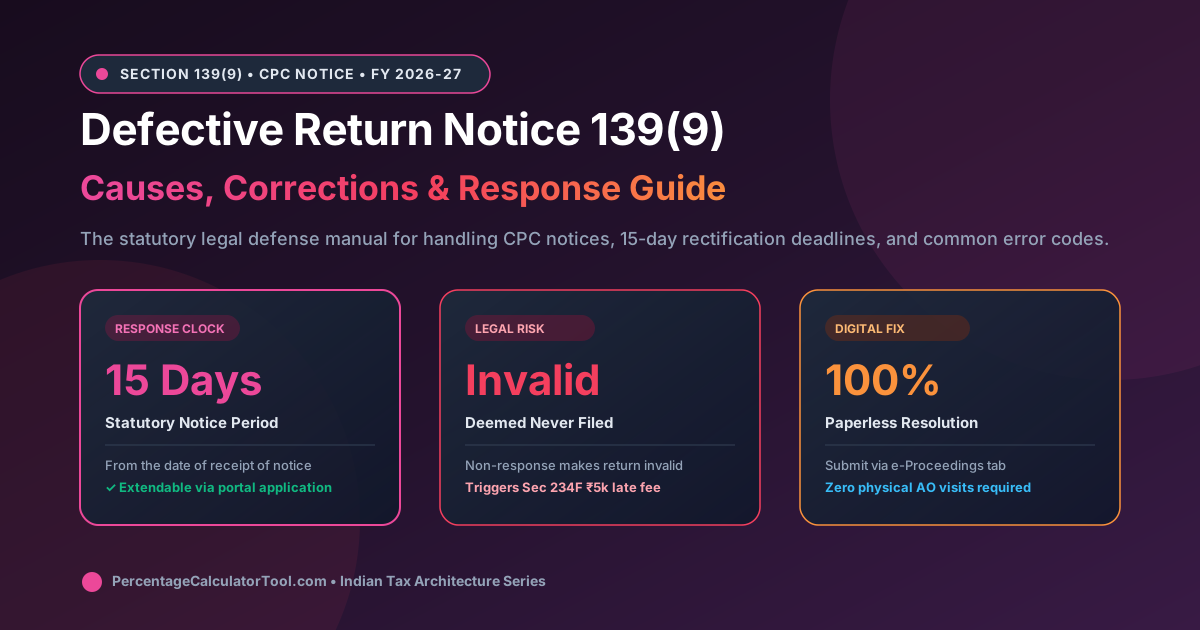
- The 15-Day Statutory Clock: Section 139(9) grants you precisely 15 days from the date of receipt to submit an online rectification. Failure to act within this window causes the return to be legally treated as invalid (never filed).
- The Perils of Invalidation: An invalid return strips away your right to carry forward capital gains losses (STCL/LTCL) or business losses, triggers late filing fees under Section 234F of up to ₹5,000, and accrues 1% monthly interest under Section 234A.
- Paperless Resolution: You do not need to visit your local Assessing Officer (AO) or hire costly legal counsel. The entire rectification workflow is executed online via the "Pending Actions > e-Proceedings" tab on the official portal.
- Form Switching Permitted: If your defect arose from choosing an inappropriate form (e.g., filing ITR-1 when you held crypto or foreign equity), you are legally permitted to switch to ITR-2 or ITR-3 directly in your response.
1. What is a Defective Return? Section 139(9) vs 143(1) vs 142(1)
Section 139(9) of the Income Tax Act states: "Where the Assessing Officer considers that the return of income furnished by the assessee is defective, he may intimate the defect to the assessee and give him an opportunity to rectify the defect within a period of fifteen days from the date of such intimation."
To properly address the notice, taxpayers must distinguish between three distinct communications issued by the Income Tax Department:
| Notice Type | Governing Section | Primary Purpose | Standard Response Required |
|---|---|---|---|
| Defective Return Notice | Section 139(9) | Flags structural errors, missing schedules, or schema invalidities | Rectify defect by filing corrected return or disagreement within 15 days |
| Summary Intimation | Section 143(1) | Final processing sheet showing tax refund or mathematical demand | Pay demand within 30 days or file rectification under Section 154 |
| Inquiry / Scrutiny Notice | Section 142(1) / 143(2) | Formal investigation requiring bank statements, invoices, and proofs | Submit written evidence and accounting books to the Faceless AO |
A Section 139(9) notice means your return has not yet been processed. The CPC cannot compute your tax liability or issue your refund until the structural defect is resolved.
2. The 15-Day Countdown & Consequences of Inaction
The statutory window of 15 days begins on the date the notice is received via email or reflected on your e-filing portal dashboard. If you fail to respond or submit an invalid response, the consequences are severe:
- The Return is Deemed "Invalid" (Void Ab Initio): Under the law, the return is treated as if you never filed it. All legal privileges associated with timely filing are instantly revoked.
- Loss of Loss Carry-Forward: Under Section 80, capital losses (Short-Term Capital Loss or Long-Term Capital Loss) and business losses (including intraday and F&O trading losses) can only be carried forward to future years if the return was filed before the statutory due date. An invalidated return forfeits these loss carry-forwards permanently.
- Late Filing Fees under Section 234F: Because your return is now deemed non-existent, re-filing after the original July 31 due date attracts a mandatory penalty of ₹5,000 (restricted to ₹1,000 if total income is up to ₹5 Lakhs).
- Penal Interest under Section 234A: Interest @ 1% per month is charged on any unpaid tax liability calculated from the original due date until the date a valid return is finally established.
- Refund Withholding: Any tax refund due to you remains permanently frozen until the defect is cured.
3. The Section 139(9) Resolution Workflow: From Notice to Closure
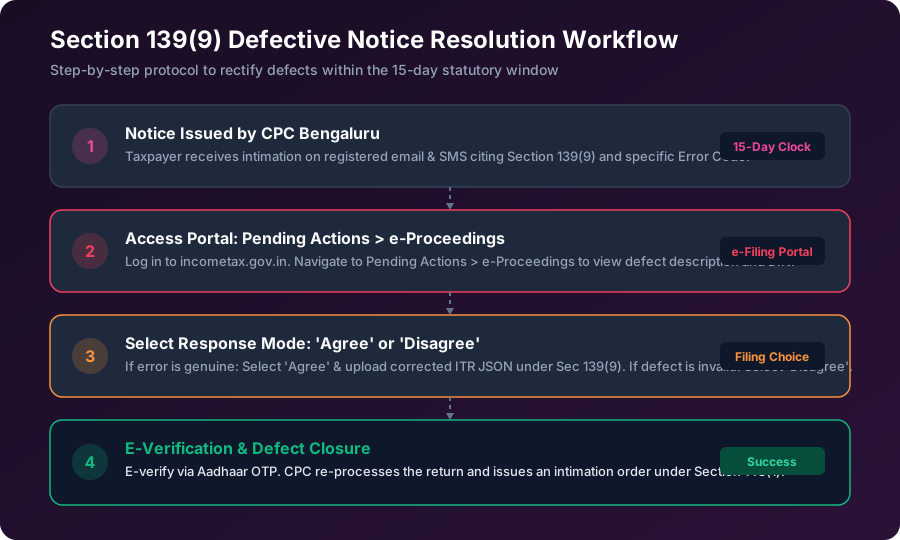
Resolving a Section 139(9) notice follows a standardized, four-step digital pathway. The diagram below illustrates how a taxpayer progresses from receiving the CPC alert to achieving final defect closure.
Let us examine each stage in operational detail:
Stage 1: Alert & Defect Identification
The notice communication email contains a Document Identification Number (DIN) and lists the specific "Error Description". It is essential to download the attached PDF notice from the portal to read the exact statutory reason code.
Stage 2: Portal Navigation
Log in to incometax.gov.in. Navigate to Pending Actions > e-Proceedings. Locate the proceeding titled "Defective Notice u/s 139(9)" for Assessment Year 2027-28. Click on "View Notices" to access the response portal.
Stage 3: Choosing Response Type
The portal presents you with two radio buttons: "Agree" or "Disagree".
- If you select Agree, the portal opens an upload module where you submit a fresh, corrected JSON return file.
- If you select Disagree, a text box opens where you must articulate your legal arguments and optionally attach supporting PDF exhibits (up to 5MB).
Stage 4: Submission & E-Verification
Once uploaded, you must e-verify the submission immediately via Aadhaar OTP, Net Banking, or Digital Signature Certificate (DSC). Upon successful e-verification, an acknowledgement receipt is generated, and the defect status transitions to "Submitted".
4. Top 4 Defective Return Error Codes & Exact Statutory Solutions
Over 90% of all Section 139(9) notices stem from four common discrepancies. Understanding the mechanics of these errors enables you to correct your return in minutes.
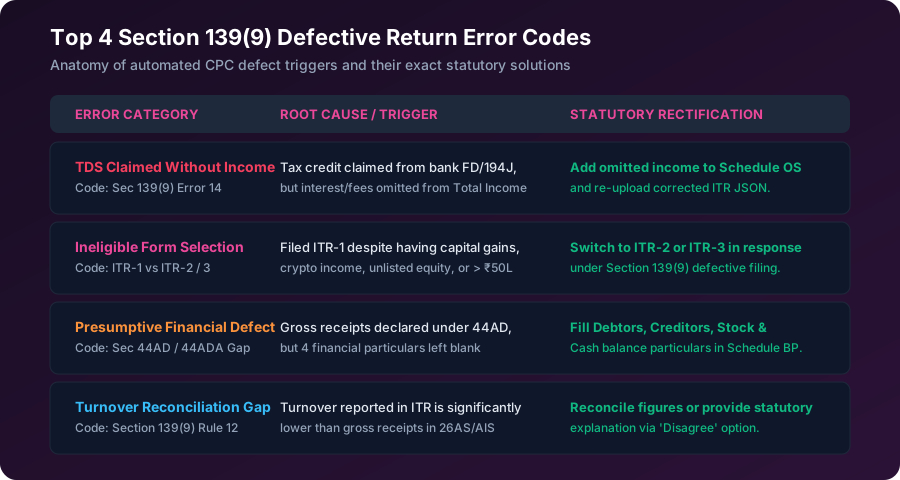
Error 1: Claiming TDS Without Declaring Corresponding Income (Error Code 14)
The Trigger: You claimed credit for TDS deducted by a bank on fixed deposit interest (under Section 194A) or a client on professional fees (under Section 194J), but you omitted entering the gross income in "Schedule OS (Income from Other Sources)" or "Schedule BP (Business & Profession)".
Statutory Fix: Under Rule 37BA, TDS credit can only be granted in the assessment year in which the corresponding income is assessable to tax. To fix this:
- Select "Agree" on the portal.
- Open your ITR offline utility or online editor.
- Navigate to Schedule OS, add the omitted interest or consulting income, recalculate total income, and generate a revised JSON.
- Upload the corrected JSON under Section 139(9).
Error 2: Inappropriate Form Selection (ITR-1 vs ITR-2 / ITR-3)
The Trigger: Filing ITR-1 (Sahaj) when you were legally disqualified from doing so. Common disqualifiers include:
- Holding unlisted equity shares or directorship in an Indian company.
- Owning foreign assets or holding foreign bank accounts (Schedule FA).
- Earning capital gains from stock market mutual funds or real estate.
- Having total gross income exceeding ₹50 Lakhs.
Statutory Fix: Download the utility for ITR-2 (for capital gains/foreign assets) or ITR-3 (for business/F&O trading). Migrate your salary and deduction details into the new form, fill the appropriate schedules, generate the JSON, and upload it as your defective return response.
Error 3: Missing Presumptive Financial Particulars (Section 44AD / 44ADA)
The Trigger: Filing ITR-4 under presumptive taxation but leaving the four mandatory balance sheet fields blank: Sundry Debtors, Sundry Creditors, Stock-in-Trade, and Cash-in-Hand.
Statutory Fix: Section 44AD/ADA relieves taxpayers from maintaining detailed books under Section 44AA, but the statute mandates reporting these four basic financial particulars as of March 31. Re-open ITR-4, enter estimated figures for these four fields matching your bank statement, and upload the updated return.
Error 4: Gross Turnover Mismatch with Form 26AS / AIS
The Trigger: Gross professional receipts or business turnover declared in the ITR are significantly lower than the gross contract values reported by clients in Form 26AS under Section 194C, 194J, or 194H.
Statutory Fix: If the client included GST in the gross billing reported in 26AS, or if the receipts represent reimbursable out-of-pocket expenses, you can choose "Disagree" and provide a structured reconciliation statement explaining why the turnover differs from the tax credit ledger.
5. The Strategic Choice: 'Agree' vs 'Disagree with Reasons'
Navigating the choice between "Agree" and "Disagree" requires objective assessment of your tax filing:
| Scenario / Condition | Recommended Choice | Operational Action |
|---|---|---|
| You made a typographical error, left a schedule blank, or chose the wrong form | Agree | Generate and upload a fresh corrected JSON utility file. |
| CPC algorithm misclassified an exempt allowance (e.g. Gratuity or EPF) as unexplained income | Disagree | Select Disagree. Quote relevant exemption sections (e.g. Sec 10(10)) and attach Form 16 / bank proofs. |
| A client filed a false or inflated TDS return against your PAN that does not belong to you | Disagree | Select Disagree. State that the income was never accrued or received, citing Section 205 and Rule 37BA. |
| You forgot to report bank savings interest or dividend income | Agree | Select Agree. Update Schedule OS and pay any differential self-assessment tax before uploading. |
6. Step-by-Step Portal Walkthrough: Uploading Corrected JSON
When you select "Agree" to rectify a defect, follow this exact technical sequence on the e-filing portal:
- Step 1: Download the Offline Utility: Download the latest Common Offline Utility from
incometax.gov.in/iec/foportal/downloadsfor the relevant Assessment Year. - Step 2: Prepare Corrected Return: Import your original pre-filled JSON. Fix the specific error flagged in the notice (e.g., fill Schedule OS or switch forms). Validate all sheets and click "Generate JSON".
- Step 3: Access e-Proceedings Dashboard: Log in to the e-filing portal, navigate to Pending Actions > e-Proceedings, locate the Section 139(9) notice, and click "Submit Response".
- Step 4: Select 'Agree' & Upload JSON: Select the radio button "Agree". The system will display the filed return details. Click "Attach File" and select your freshly generated JSON file.
- Step 5: E-Verify Response: Click "Submit". The system will prompt for authentication. Complete e-verification immediately using Aadhaar OTP.
- Step 6: Download Acknowledgment: Save the Response Acknowledgement Number (ARN) for your records. Check back within 10 days to confirm the status updates to "Processed".
7. How to Request an Extension of Time (Adjournment)
If your defect requires obtaining missing bank certificates, getting accounts audited under Section 44AB, or resolving a PAN error with an employer, 15 days may be insufficient.
You have the statutory right under the Proviso to Section 139(9) to apply for an extension:
- Go to Pending Actions > e-Proceedings > View Notices.
- Click the button labeled "Seek Adjournment".
- Select the number of additional days requested (typically 15 to 30 days).
- Enter a valid reason in the text box (e.g., "Awaiting audited balance sheet and tax audit report under Section 44AB from statutory auditor").
- Submit the request. Once approved by the jurisdictional Assessing Officer, your 15-day countdown is paused.
Verify Your Tax Liability & Take-Home Salary
Avoid defective notices and incorrect slab computations. Use our 100% free, private financial calculation suite to verify your exact tax liability and in-hand salary before filing.
8. Frequently Asked Questions (FAQ)
What is a defective return notice under Section 139(9)?
A notice under Section 139(9) is issued by the Centralized Processing Centre (CPC) Bengaluru or the Assessing Officer when an Income Tax Return is found to contain structural errors, missing schedules, incorrect ITR forms, or discrepancies between declared income and tax credits reported in Form 26AS or AIS.
How many days do I have to respond to a Section 139(9) notice?
The taxpayer has exactly 15 days from the date of receipt of the notice (or such extended period as the Assessing Officer may allow upon application) to rectify the defect by submitting a response on the official e-filing portal.
What happens if I ignore a Section 139(9) notice or miss the 15-day deadline?
If the defect is not rectified within 15 days, the return is legally treated as an 'invalid return' (deemed to have never been filed). This forfeits carry-forward of capital or business losses, triggers Section 234F late fees of up to ₹5,000, incurs Section 234A penal interest, and blocks tax refunds.
Can I request an extension of time to respond to Section 139(9)?
Yes. If you need more time to procure financial statements or consult a chartered accountant, you can log in to the e-filing portal, navigate to Pending Actions > e-Proceedings > Defective Notice, and click 'Request Adjournment / Extension' explaining the reasonable cause.
When should I select 'Disagree' in response to a Section 139(9) defect?
Select 'Disagree' only if you believe the defect flagged by CPC is factually or legally erroneous—for instance, if an advance received or non-taxable reimbursement was erroneously tagged by a payer under a commercial TDS section in 26AS. You must submit detailed written legal justifications in the text box.
Can I change my ITR form when correcting a defective return?
Yes. If the notice states that you were ineligible for the original form (e.g., you filed ITR-1 but held unlisted shares, foreign assets, or capital gains), you are legally permitted to switch to the correct form (such as ITR-2 or ITR-3) while uploading the corrected return under Section 139(9).
Is filing a response under Section 139(9) the same as filing a Revised Return under Section 139(5)?
No. A revised return under Section 139(5) is voluntary and filed before December 31 when you discover an omission on your own. A response under Section 139(9) is mandatory and statutory in direct compliance with an official defect notice issued by the department.
Do I need to e-verify the corrected return submitted under Section 139(9)?
Yes. After uploading the rectified JSON or corrected particulars on the e-filing portal, you must e-verify the submission immediately using Aadhaar OTP, net banking, or EVC within 30 days to complete the legal process.